
Precision Air Conditioning for Server Rooms and Data Centers
Machine-translated from Vietnamese. Read the original in Vietnamese

The correct air conditioning for Server and Data Center rooms should be designed according to IT load, rack density, airflow and redundancy levels instead of just based on area. Learn CRAC, CRAH, In-Row Cooling, Hot Aisle – Cold Aisle, N+1 and HRT's HVAC Data Center consulting process.
Precise air conditioning for Server and Data Center rooms: not just “cooling”
Server and Data Center rooms are areas with high density of electronic equipment, continuous operation and large heat generation.
Servers, storage, switches, UPS, PDUs and network devices convert most of their power consumption into heat. If the heat is not properly removed, the temperature at the suction end of the IT device can rise quickly even though the average temperature in the room is still at a normal level.
So, the Data Center cooling problem is not simple:
How many m2 room → choose how much kW air conditioner.
An effective system must simultaneously control:
- Thermal load reality.
- The temperature.
- Moisture.
- Airflow rate.
- The path of cold and hot air.
- Load density by rack.
- The possibility of backup.
- Expansion possibilities in the future.
- Monitoring and warning system.
That's the role of... Precision Cooling – Precise Air Conditioner.
The main image suggested to put right after the opening:
She...
What is Precision Cooling?
Precision Cooling is a dedicated air conditioning solution for areas where stable environmental control and continuous operation are required.
Compared to comfort air conditioners used for offices, hotels or homes, precise air conditioning focuses more on:
- Large thermal load sensing processing capacity.
- Type CEO Hoang + Data Center + title:
- Control the humidity.
- Airflow rate is stable.
- Accurate gas distribution.
- Operation 24/7.
- Warn about problems.
- Equipment redundancy.
These systems are typically used for:
- Server Room.
- Data Center.
- Telecommunications center.
- Network equipment room.
- Control center.
- UPS room.
- Important electronics room.
Why is it not suitable for a residential air conditioner or office air conditioner?
Comfortable air conditioners are designed primarily to provide comfort for humans.
Meanwhile, thermal load of Server room has completely different characteristics.
high concentration thermal load
A Server rack can generate large amounts of heat in very small areas.
As more rack concentrates in the same area, the cooling load density per square meter increases significantly.
Continuous Operation Load
Server does not rest at night or weekend if IT system is still working.
Therefore, cooling must also be able to function accordingly.
Inductance load accounts for a large proportion
Heat comes primarily from electronics, so inductance processing is particularly important.
More precise control required
A Data Center can't just care about the average temperature of the room.
More importantly:
What is the actual temperature at the suction end of the IT device?
Three Data Must Be Determined Before Selecting The Device
Before choosing CRAC, CRAH or In-Row Cooling, HRT preferentially identifies three groups of platform data.
Total IT load
Includes:
- Server.
- Storage.
- Switch.
- Router.
- Firewall.
- Networking equipment.
- UPS.
- PDU.
- Electrical equipment related.
Total actual load is one of the most important bases for determining cooling load.
Load density by rack
Not all rack heaters produce the same amount of heat.
May Appear:
- Low load rack.
- Rack load medium.
- High density rack.
- GPU or HPC racks have particularly high loads.
So, in addition to the total room load need to know the load distributed by each area.
Ability to increase load in the future
A Server room can operate well at the current time but quickly overloaded when:
- Add servers.
- Add the rack.
- Upgrade your hardware.
- Deploy GPUs.
- Increase storage density.
Cooling designs need to be scalable accordingly.
What components does the server cooling load need?
Cooling load Data Center should not be defined only from area.
A complete calculation takes into account multiple heat sources.
Download from IT device
This is usually the main ingredient.
The power consumption of the IT device will eventually almost convert to heat inside the room.
Load from UPS and electrical equipment
UPS, PDU, electrical cabinet and some power switches all generate heat during operation.
Load Lighting
Even though it is smaller than the IT load, lighting still generates heat.
Human Load
Server rooms often have few people working regularly but still need to take into account when there are maintenance technicians.
Load transmitted through wall, roof and door
Server rooms located near the roof, external walls or high temperature areas can receive additional thermal load from the environment.
Redundancy and expansion factor
It is not recommended to design a system with only enough current load if Data Center has a development plan.
Airflow determines Data Center cooling efficiency
One of the issues that HRT often prioritizes when surveying is airflow – organizing the air flow.
A system with sufficient cooling capacity can still have hot spots if the airflow is not properly organized.
For example:
The cooling device produces enough cold air but the cold air either goes around, mixes directly with the return air or does not reach the suction end of the rack.
Then:
- A subcooling area.
- An area still hot.
- Server fan speed up.
- Air conditioner must operate more.
- Lower energy efficiency.
- The hot spot still exists.
So:
Enough cooling capacity is not enough. The refrigerant must go where it needs to be cooled.
Hot Aisle and Cold Aisle help control airflow
One of the basic options for controlling airflow in Data Center is to organize the rack into Hot Aisle and Cold Aisle.
Cold Aisle
The suction side of the servers returns to the cold corridor.
The cold air is fed into this area before going through the server.
Hot Aisle
The hot side of the server blows into the hot corridor.
The hot gas after passing through the device is recovered to the cooling system.
The relatively clear separation of hot and cold air flows helps:
- Reduce gas mixing.
- Limit hot spots.
- Increase cooling effect.
- Reduce energy waste.
When to Containment?
With Data Center with high load density, only Hot Aisle – Cold Aisle layout is sometimes not enough.
Containment helps prevent mixing between two airflows.
Cold Aisle Containment
Cold corridor is enclosed to concentrate cold air at the suction end of the server.
Hot Aisle Containment
The hot gas is collected in the hot corridor and directly returned to the cooling device.
When deploying containment must coordinate with:
- PCCC.
- - Chen.
- Lifting floor.
- Electrical cables.
- Network cable.
- Rack height.
- Pressure control system.
How are CRAC, CRAH and In-Row Cooling different?
There is no one device type that fits every Data Center.
CRAC – Computer Room Air Conditioner
CRACs often use a DX direct refrigeration system.
Equipment may include:
- Compressor.
- Evaporator coil.
- Fan.
- Expansion valve.
- Controller.
- Temperature sensor and humidity.
CRAC is suitable for many small to medium-sized Server and Data Center rooms.
CRAH – Computer Room Air Handler
CRAH uses cold water from Chiller system.
Basic diagram:
Chiller → chilled-water pump → CRAH → Data Center → CRAH
CRAH is usually suitable when:
- The building has Chilled Water.
- Huge total cooling load.
- Data Center is large scale.
- Centralized operation required.
In-Row Cooling
In-Row Cooling places cooling equipment near or between rack.
The important advantage is to reduce the distance between:
Heat emitting source ↔ cooling device.
This solution is worth considering when:
- Rack has high load density.
- Loads are unevenly distributed.
- Room Cooling has a hot spot.
- Data Center development modules.
Quick comparison of cooling options
| Solution | Characteristics | Suitable Applications |
|---|---|---|
| CRAC | Direct DX Cold | Server Room, Small and Medium Data Center |
| CRAH | Used Chilled Water | Medium and Large Data Center |
| In-Row | Cooling near rack | High load density, hot spot |
| Rack Cooling | Cooling near each rack | High Capacity Rack |
| Liquid Cooling | Liquid Cooling | GPU, HPC, very high density load |
Selection should be based on actual load, not just technology name.
Cooling backup: N, N+1 or 2N?
Cooling is part of the critical infrastructure in Data Centers.
If a device stops abruptly without backup, the room temperature can rise rapidly.
Configure N
A sufficient number of devices to meet the required load.
The advantage is lower investment cost but limited redundancy.
Configuration N+1
In addition to the amount of equipment needed to meet the load there is also an extra backup device.
For example:
If 3 devices are needed to meet the load, the system arranges 4 devices.
A machine can stop maintenance while the system still meets design load.
2N Configuration
The two systems are capable of responding to loads in independent configuration.
2N offers higher redundancy levels but also increases:
- Equipment costs.
- Electrical system.
- Pipeline.
- Technical space.
- Control system.
The redundancy level must be selected based on the importance of the Data Center.
HRT process of consulting air conditioner for Server and Data Center rooms
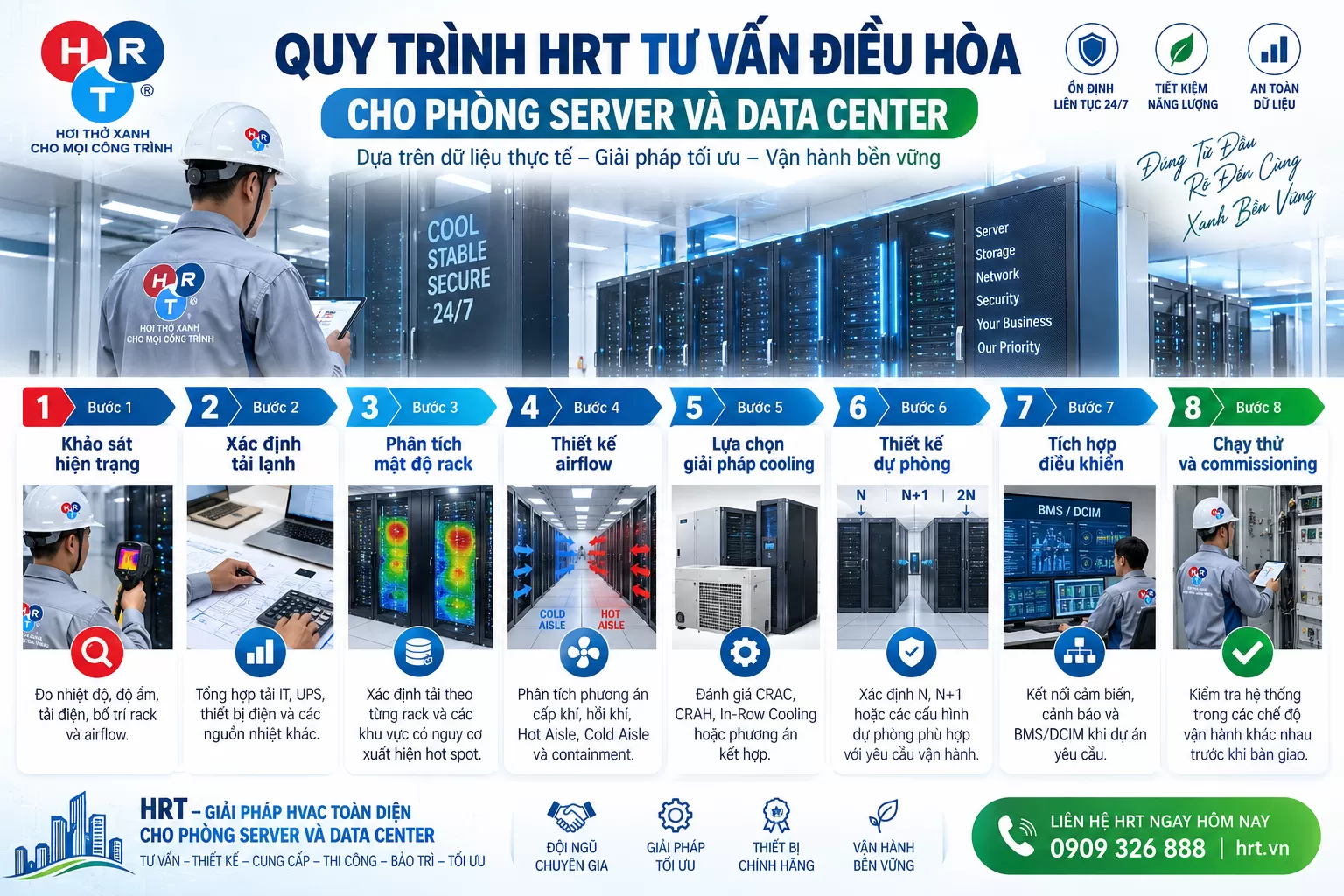
Instead of choosing a device first and then checking it to see if it's suitable, HRT approaches from the actual data of the system.
Insert the created 8-step infographic here.
ALT photo: HRT process consulting air conditioning Server and Data Center
Step 1: Surveying the current status
Testing:
- The temperature.
- Moisture.
- Load power.
- Rack layout.
- Airflow.
- Existing cooling system.
Step 2: Determine cooling load
Synthesis:
- Download IT.
- UPS.
- PDU.
- Electrical equipment.
- Illuminate.
- Heat transfer load.
Step 3: Rack Density Analysis
Determine the load by each rack and locations at risk of hot spots.
Step 4: Design airflow
Analysis:
- Air supply.
- Rejuvenate.
- Hot Aisle.
- Cold Aisle.
- Containment.
Step 5: Select cooling solution
Rating:
- CRAC.
- CRAH.
- In-Row Cooling.
- Rack Cooling.
- Combined solution.
Step 6: Design redundancy
Configuration Determine:
- N.
- N+1.
- 2N.
according to the operation requirements of the project.
Step 7: Control system integration
The device can be connected to:
- BMS.
- DCIM.
- The warning system.
- Temperature sensor.
- Humidity sensor.
- Water leakage sensor.
Step 8: commissioning and commissioning
Before handover, it is necessary to test the system in multiple operation modes to assess load response and redundancy.
Common mistakes when designing server room air conditioner
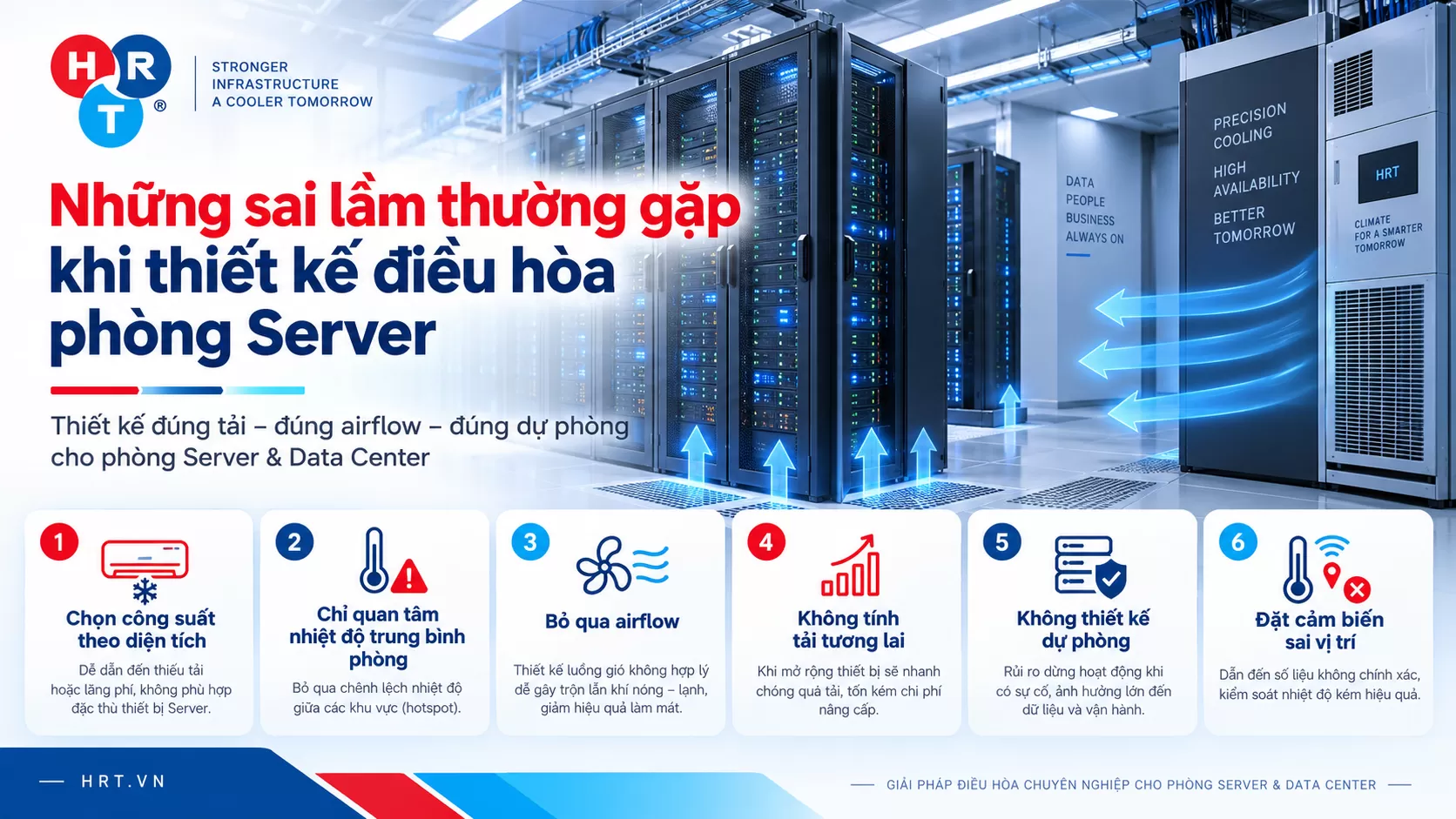
This is the right area to use infographics “Common mistakes when designing server room air conditioner” created.
Select capacity by area
This is a common mistake.
Two Server rooms have the same area but total IT load can be very different.
Hence:
m2 is not the main data to determine Precision Cooling Capacity.
Only the average room temperature is concerned
Just because the room temperature is 23°C doesn't mean every server receives 23°C gas.
A rack can still superheat if the hot gas returns to the suction end.
Ignore airflow
Increasing cooling capacity does not always solve the hot spot.
In many cases, the cause lies in the distribution of gas.
No future loading
When adding Server but cooling is not scalable, the system will quickly overload.
No redundant design
If the entire load depends on a cooling device, maintenance or failures may affect the IT system.
Place sensor in wrong position
Sensors placed near the refrigeration door can give very beautiful results but do not reflect the conditions at the server suction head.
Sensors should be arranged based on actual monitoring objectives.
What does the control and monitoring system need to monitor?
For critical Data Center, cooling should not be operated as a stand-alone system.
Data points that can be fed to BMS or DCIM include:
- Rack suction head temperature.
- Return air temperature.
- Moisture.
- Fan status.
- Compressor status.
- Cold water valve.
- Report device errors.
- High temperature warning.
- Power failure warning.
- Warn about water leaks.
- Power consumption.
Continuous monitoring helps operations teams detect unusual trends before IT systems are affected.
How to reduce the power cooling Data Center?
Reducing power does not mean reducing cooling capacity at all costs.
The goal is to use cooling power more efficiently.
Optimized airflow
Limiting the mixing of hot and cold air increases the efficiency of existing systems.
Use of speed fans
EC or VFD fans allow for flow rate changes according to actual load.
Optimizing Chiller System
With the CRAH system, it is necessary to consider simultaneously:
- Chiller.
- Pump.
- Cooling Tower.
- Cold water temperature.
- Load - driven control.
Condition based control at rack
Conditions at the server suction head are more significant than the average room temperature index.
When to re-survey the server room air conditioning system?
Enterprises should re-evaluate cooling system when one of the signs appears:
- Server high temperature warning.
- There's a hot spot.
- Some rack is markedly hotter.
- Air conditioner running continuously.
- IT capacity increased significantly.
- Add a new rack.
- Cooling electricity bills rise.
- Cooling device frequently error.
- Prepare to expand your Data Center.
- No backup cooling.
- Temperature fluctuations are strong.
- Airflow is unclear.
It is not recommended to wait until the IT system superheats to reevaluate cooling.
HRT's Precision Cooling Survey Checklist
A technical survey should collect a minimum of:
- Total room area.
- Room height.
- Rack quantity.
- Capacity per rack.
- Total IT load.
- UPS and PDU.
- Expected capacity expansion.
- Rack suction head temperature.
- Return air temperature.
- Moisture.
- Current hot spot.
- Lifting floor.
- Engineering ceiling.
- Power supply.
- The generator.
- Chiller exists.
- BMS/DCIM system.
- Request backup.
- Condition of cooling equipment layout.
- Ability to maintain and replace equipment.
The more complete the survey data, the more accurate the selection of equipment.
Why shouldn't Precision Cooling quotes be from area only?
A quote is based on the question:
“How many HP is needed in a 100 m2 Server room?"
often not enough technical basis.
Before choosing the device should be clarified at least:
IT loading → Rack density → Airflow → Redundancy → Future expansion.
Without these data, there are two risks.
Lack of power
The system can:
- It doesn't keep the temperature.
- There's a hot spot.
- Reduce redundancy.
- Affects the server.
Residual Capacity
Excessive residual power may:
- Increase your investment.
- Increase your electricity costs.
- Operation device is not optimal.
- Difficulty controlling the system.
The goal of the design is not to choose the machine as large as possible but rather:
choose the right capacity and the right cooling architecture.
HRT’s data center HVAC solutions
HRT provides HVAC services for Server and Data Center from survey to operation.
The range may include:
- Survey the system.
- Calculate the cooling load.
- Airflow design.
- Precision Cooling.
- CRAC.
- CRAH.
- In-Row Cooling.
- Chiller.
- Chilled Water.
- Hot Aisle – Cold Aisle.
- Containment.
- BMS system.
- Data Center renovation.
- Replace cooling equipment.
- Commissioning.
- Maintenance.
- Optimize your energy.
Priority HRT principle:
True load – True airflow – True redundancy – True scalability.
Conclusion
The correct air conditioning for Server and Data Center rooms is the synthesis problem between:
Cooling + Airflow + IT Load + Redundancy + Control + Future Expansion.
A system with large cooling capacity may not work well if:
- Cold air doesn't reach the rack.
- Hot and cold gases mixed.
- There's no backup.
- Don't count the load increase.
- Sensors are not in place.
HRT accesses Data Center system from actual data, load calculation, airflow analysis and operation requirements before selecting equipment.
If Server room is in a state superheat, hot spot, constant running air conditioner, increase IT load or prepare for expansion, should survey the whole cooling system before deciding to add equipment.
HRT – HRT Air Conditioning and Ventilation Company Limited
Source: Publisher’s English edition · Vietnamese original on doanvanhoang.com